




Juxtaposer Review – Mix and match pictures, as easy as pie
 By
By App Type: Uncategorized

Our rating: 
By: Juxtaposer
Version #: 2.8.1
Date Released: 2012-10-31
Developer: https://www.pocketpixels.com/Juxtaposer.html
Price: 2.99
User Rating:

 Loading...
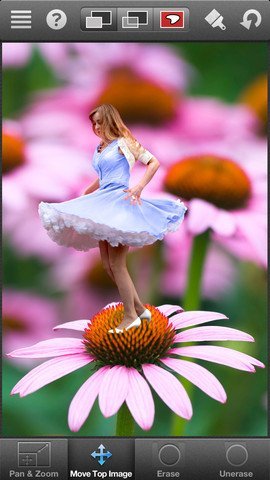
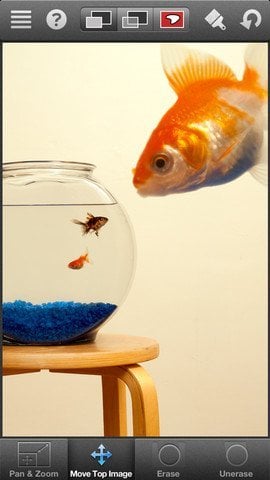
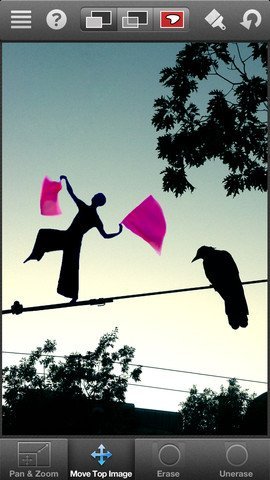
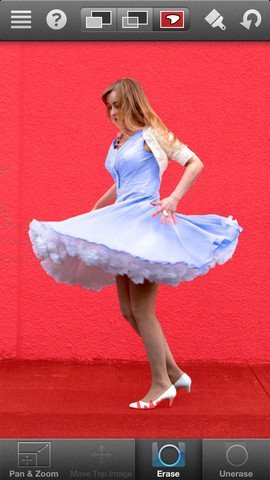
Juxtaposer can give you some laughs. The other night we were out to celebrate my father-in-law’s 60th birthday. For the last six months to a year I have been mercilessly teasing him about his rapidly approaching milestone birthday. His 60th celebratory dinner seemed like an excellent time to up the ante just a bit. (Disclaimer: I love and respect my father-in-law and consider him a friend on top of everything else — that does not, however, mean that I will take every opportunity to give him a hard time. Moreover, at 60 the SOB is still in far better shape than I am.) So I nonchalantly took a picture of him, found a picture on the Internet of a decrepit 110-year-old man and proceeded to put my father-in-law’s face on someone who looked more like the crypt keeper than anything else. Everyone got a good laugh — everyone except, perhaps, my father-in-law. What stands out about this is twofold — First, what would have been a complex process a short time ago was absolutely simple because of the superb software I was using. Second, I did it all on my iPhone in a matter of seconds The iPhone’s camera leaves a good deal to be desired but (note: since the first version of this review, iPhone cameras have improved a 1000 times, yay!), put it in the hands of the right developer, there is seemingly no end to the possibilities. Juxtaposer is an example of just that. If you haven’t figured it out yet, I love this application. The good folks over on TUAW called Juxtaposer “one of the best-executed compositing tools for a mobile device that I’ve ever seen.” I could not agree more. The concept is really quite simple — you layer one image on top of another and then remove portions of the upper image so that it appears to be part of the lower image. It really works and the results are often hysterical. The fact is, though, an application might perform such a task well but if it isn’t easy to use and is foolproof as possible, it’s not very useful to people like me. What’s great about this application is that it walks you through the process step-by-step. Moreover, it includes an unlimited number of undoes so that you can try various things without ever worrying you lose your progress thus far. Juxtaposer has a nice, but not overwhelming selection of tools. There are hard and soft brushes for refining the edges of your image, there’s a tool for smoothing between images so that everything looks like one piece, there is a “red mask” mode that lets you isolate a specific area in an image and work on it without distraction. Best yet, the translucent mode allows you full control over aligning the two images so that there isn’t any guesswork involved. It even includes the flexibility to work in either portrait or landscape mode so you can find the most comfortable way to proceed. Editor note: Juxtaposer is under active development, and recently has moved to the whooping version 2.8.1, while having more than 4 stars in all their versions. Why don’t you give it a try?
Quick Take
Value:Exceptionally high
Would I Buy Again:Without giving it a second thought
Learning Curve:Low to do rough work, a little bit higher if you really want accuracy
Who Is It For:Anyone who likes to play around with images, has a sense of humor, though, actually, anyone who has an iPhone.
What I Like:The application works incredibly well and makes an otherwise challenging process simple and fun. It blows my mind that you can do such things on an iPhone.
What I Don't Like:Nothing (although after I passed a picture of my father-in-law looking like 110 year old crypt keeper -- he might disagree.)
Final Statement:This is a fun app and is definitely one of my "must haves" on the iPhone. Between this application and Pano the iPhone's camera becomes a truly capable devices.
 booth
booth Take any element from one picture and add it to another. Put your friend's head on a statue's body, remix your pets into a mythical creature, or combine photos into surreal and beautiful works of art, it's simple and the process is fun.